OnSnap
- 4.4
- Rating
- 100.00K
- Installs
- Free
- Price

 Analysis by App-foxy
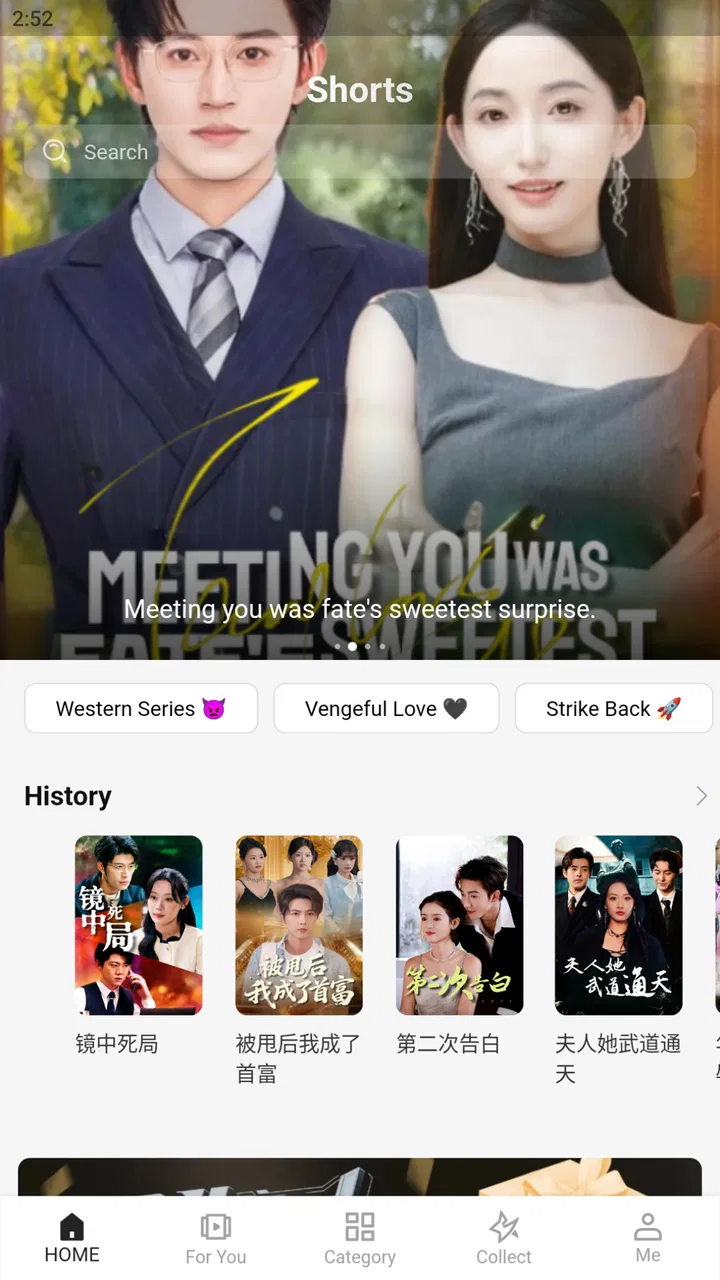
OnSnap is a free Music & Audio app built around a clear idea: giving ethnic Chinese users a shared entertainment space rather than making them jump between unrelated services. I found that focus more interesting than the short store description suggests. Instead of treating it as just another music player, I approached it as a place for discovering and enjoying culturally familiar entertainment in one app.
That distinction matters because the best app for listening is not always the best app for finding something that feels relevant. Mainstream audio platforms are usually excellent at huge catalogs, playlists, and polished recommendations, but they can feel broad and impersonal. OnSnap’s appeal is more specific. It is aimed at an audience with common language and cultural reference points, which can make the experience feel more immediately approachable for the right person.
The app is developed by 香港瀚洋國際控股集團有限公司 and is available at no upfront cost. It has an Everyone age rating, so it is positioned for a wide audience rather than a narrowly defined age group. I also noticed that the current release is version 1.0.9, which makes it sensible to keep expectations realistic: the app already has a meaningful audience, but it still feels like a service where ongoing refinement will matter.
You May Also Like

 Blood Strike: 2.5 Anniversary
Blood Strike’s Loadouts Turn Every Drop Into a Tactical Gamble
A close look at Blood Strike’s custom loadouts: how fast access to signature weapons reshapes its battle royale rhythm, rewards preparation, and narrows the gap between fights.

 Pandora - Music & Podcasts
Pandora’s Music Is Easy to Start, but Harder to Recover
Pandora’s strength is its low-effort path from a seed to a station. Its weak spot is how much confidence it asks you to place in connection, setup, and quiet recovery.

 8 Ball Pool
 Is Built on Rivalries, Rematches, and Routine
A close look at the rivalries, rematches, shared routines, and unanswered safety questions that turn a quick pool match into a persistent mobile community.

 Samsung Music
’s Quiet Strength Is Playing What You Already Own
Its reach comes less from spectacle than from dependable access to a personal library. That simplicity is both the app’s strongest retention engine and its ceiling.

 AccuWeather: Weather Radar
AccuWeather Review: A Quick, Clear Forecast for Everyday Decisions
For everyday plans, the best forecast is the one you can understand quickly. AccuWeather makes rain timing, radar, and local conditions easy to act on, with a few trade-offs.

 Hill Climb Racing
Why Hill Climb Racing Still Turns Crashes Into One More Run
A tiny car, a bumpy hill and one more upgrade: Hill Climb Racing keeps resurfacing because its simple chaos makes every near-miss feel personal.
More From Our News Desk
View All News


OnSnap’s central capability: a shared Chinese entertainment space
The most important thing to understand is that OnSnap is not compelling simply because it plays audio. Its central capability is the way it brings an ethnic Chinese entertainment audience into one focused environment. That changes what I look for when using it. I am less interested in comparing it with a general-purpose player on technical breadth and more interested in whether it reduces the effort of finding content that feels culturally familiar.
In everyday use, this kind of focus can be valuable for several types of listener. Someone who regularly searches for Chinese-language entertainment may prefer a destination that feels immediately relevant. A family with different generations may also appreciate a service that sits closer to shared cultural interests than a highly personalized platform built around one person’s listening history.
The store summary describes OnSnap as an entertainment platform for a very large ethnic Chinese audience. I would not interpret that as a promise that every user will find the same material equally useful. Rather, it explains the app’s identity. The service is trying to create a common space, and that is its strongest point of difference from a standard audio utility.
That focus also gives the app a practical role beyond background listening. I can imagine opening it when I want to browse culturally familiar entertainment without first translating search terms, remembering several separate services, or filtering through a general catalog that was designed for everyone. The benefit is not necessarily louder sound or more advanced playback controls; it is a shorter path to the kind of content I already want.
Why this focus feels different from a normal music player
A conventional music player usually starts with the assumption that the user already knows what to play or is happy to accept broad recommendations. OnSnap’s identity points in another direction. It is more useful when the starting question is, “What is available for my community and cultural interests?” rather than, “Which individual track should I play right now?”
That makes the app easier to recommend to a user who feels underserved by generic entertainment feeds. It may also be a comfortable first installation for someone who does not want to build a complicated library before the service becomes useful. The cultural focus supplies an initial reason to explore, which many ordinary players lack.
At the same time, I would not replace every audio service with OnSnap. If my priority were a carefully organized personal collection, advanced listening tools, or a familiar workflow built around a broad international catalog, a mainstream alternative could remain the better fit. OnSnap’s value depends heavily on whether its audience focus matches what I want from an entertainment app.
What using the app is like in practice
I found the best way to approach OnSnap is to treat it as a discovery destination first and a utility second. I would open it with a general intention—finding something suitable for a quiet evening, a family gathering, or a short break—rather than expecting it to behave exactly like a local music library. That mindset helps because the app’s main promise is the surrounding entertainment context, not merely the act of pressing play.
A useful workflow is to begin with one familiar interest, then allow the app to broaden the session from there. For example, if I am looking for Chinese-language entertainment for a shared room, I would avoid trying to make a perfect queue immediately. I would first see what catches my attention, save the options that fit the mood, and only then decide whether I need a longer session. This reduces the common problem of spending more time organizing entertainment than enjoying it.
There is a second, less obvious advantage to this approach. A culturally focused platform can work as a conversation starter. When several people have overlapping language or cultural interests, browsing together is easier than asking each person to open a separate account or explain the logic behind a personal recommendation feed. OnSnap can therefore be useful in social situations where the choice of entertainment is shared rather than private.
For a realistic example, imagine a weekend visit from relatives. I might want something familiar playing in the background while people talk, but I would not want to interrupt the conversation every few minutes to search manually. I could use OnSnap as the starting point, choose material that suits the group, and keep the phone interaction brief. The app’s community-oriented positioning is more valuable in that setting than a highly specialized solo listening tool.
Another practical use is introducing the app to a family member who is comfortable with Chinese entertainment but less comfortable navigating a large international service. A focused environment can lower the learning curve because the reason for opening it is obvious. That does not guarantee that every screen will feel effortless, but it gives the user a clearer mental model than an enormous catalog with countless unrelated choices.
How to get more from a focused service
I would avoid judging OnSnap after opening it only once and playing the first available item. The more useful test is whether it becomes a repeatable shortcut for a particular kind of entertainment. I would use it at different times of day, try both individual and shared listening, and pay attention to whether the culturally focused selection actually saves me time.
It is also worth deciding in advance whether I want passive browsing or a deliberate listening session. Passive browsing is where the app’s broad entertainment identity may feel most natural. Deliberate sessions require more personal organization, especially if I already have habits built around another player. Knowing which of those two jobs I expect OnSnap to perform prevents an unfair comparison with apps designed around a different purpose.
Because the app is free to install, it is easy to test this workflow without committing money at the beginning. However, free access should not be confused with a completely cost-free experience. OnSnap includes in-app purchases ranging from $0.99 to $39.99 per item, so I would check the purchase prompt carefully before confirming anything. That is particularly important when sharing a device with family members or allowing someone else to browse.
The purchase range also changes how I would recommend the app. I am comfortable suggesting it as a low-risk trial, but I would not tell a reader to spend immediately just because the app’s cultural focus sounds appealing. First establish whether the available entertainment fits your routine. If it does, optional purchases may make sense; if it does not, paying will not solve the basic mismatch.
The situation where OnSnap makes the most sense
OnSnap is at its strongest when the user wants culturally relevant entertainment and does not want that goal buried inside a general-purpose platform. The clearest scenario is a Chinese-speaking household or social group looking for something everyone can recognize and enjoy. In that context, the app’s identity is not a minor detail; it is the reason to choose it.
I can also see value for people living away from places where Chinese entertainment is easy to find in everyday settings. A focused app can serve as a convenient digital meeting point, especially when the user’s entertainment habits are connected to language, family, or cultural memory. The appeal is emotional as well as practical, although I would still judge the experience by how quickly it helps me find something worth playing.
OnSnap may be useful for a listener who is tired of recommendations that keep drifting toward globally popular content. General services often optimize for broad engagement, while a community-oriented app can make the initial browsing experience feel less random. That does not mean every recommendation will be perfect, but the starting pool is more likely to feel relevant to the intended audience.
There is a subtle benefit for mixed-age groups too. Younger users may already know how to navigate large streaming platforms, while older relatives may prefer a service with a more obvious cultural purpose. OnSnap can provide common ground, provided everyone is comfortable with the app’s interface and any purchase prompts. I would introduce it gradually rather than assuming that one shared account or device will suit every household.
For solo users, the best scenario is different. I would choose OnSnap when I want to browse Chinese entertainment with less friction, not when I need the most powerful personal audio-management system. It can complement a main music service rather than replace it. That “second app” role is important: a specialized destination can be worthwhile even if it is not the only player on the phone.
The tradeoffs I would consider before installing
The first tradeoff is focus versus breadth. OnSnap’s cultural orientation is its reason to exist, but it also means the app will be most satisfying to people who genuinely want that focus. If my listening is mostly unrelated to Chinese entertainment, I would probably get more value from a broader service with stronger general discovery tools.
The second tradeoff is simplicity versus control. A community-oriented entertainment app can make discovery feel more direct, but users who carefully manage albums, playlists, playback behavior, or personal libraries may miss the depth of a mature mainstream platform. I would not assume that a culturally focused experience automatically includes every organizational feature I use elsewhere.
The third tradeoff concerns purchases. The app is free to download, which makes trying it straightforward, but the presence of optional items means I would keep spending under control. My practical advice is to treat every purchase as a separate decision and avoid handing the phone to a child or guest without checking how confirmations work on the device. That is a small habit, but it prevents an otherwise positive trial from becoming frustrating.
There is also a maturity tradeoff. With version 1.0.9, I would expect the app to keep evolving, and I would be patient about small rough edges while evaluating whether the main concept works for me. That does not excuse persistent problems, but it does mean I would judge the service primarily on its central capability rather than expecting the polish accumulated by much older audio platforms.
The rating gives the app a positive first impression: it holds a 4.4 average from around 430 ratings. I see that as encouraging, but not as a substitute for checking whether the audience matches my own needs. A well-liked niche app can still be the wrong choice for someone seeking a completely different listening experience.
OnSnap is also not the right option if I need a guaranteed solution for a highly specific catalog request, a professional audio workflow, or a replacement for every entertainment service I already use. In those cases, I would compare it with the specialized or mainstream alternative that already handles that task well. Its strength is purposeful cultural discovery, not universal coverage of every audio habit.
Who will gain the most from this app?
The clearest beneficiaries are ethnic Chinese users who want a shared entertainment destination with an immediately understandable cultural purpose. That includes individuals, families, and social groups who regularly look for Chinese-language or culturally familiar material and would rather not begin every session inside a huge general catalog.
I would also recommend trying it to someone who wants a companion to an existing music service. There is no need to force one app to handle every listening situation. A broad platform can remain the place for carefully managed personal playlists, while OnSnap becomes the quicker choice for community-oriented discovery and shared browsing.
People who should approach it cautiously are those who rarely consume Chinese entertainment, those who require advanced audio controls, and those who want a completely predictable free experience without optional purchases. They may install it and find that its main advantage simply does not apply to them. In that case, a general music player or a service built around their specific technical needs would be more sensible.
Parents and family organizers should also decide whether the app is being used privately or collectively. Its Everyone rating makes it broadly approachable, but an age label alone does not remove the need to supervise purchases or choose suitable entertainment for a particular household. I would set expectations with younger users before sharing the device, especially because the app offers paid items.
For me, the deciding question is simple: do I want a culturally focused entertainment space, or do I only want a conventional audio player? If the answer is the former, OnSnap has a clear reason to earn a place on the phone. If the answer is the latter, its most distinctive quality may not matter enough to justify changing established habits.
After using it with that distinction in mind, I see OnSnap as a focused companion rather than an all-purpose replacement. Its free entry point makes experimentation easy, its Everyone rating keeps the audience broad, and its community orientation gives it a purpose that ordinary players do not share. The experience is most convincing when several people want culturally relevant entertainment together, or when one listener wants a faster route to that kind of discovery.
My recommendation is to try it without immediately spending money, use it in the real situation where you expect it to help, and then decide whether it saves time or creates a better shared mood. If it does, the app’s focused identity is a genuine advantage. If not, a larger mainstream alternative will probably serve you better. The real value here is relevance, not simply playback.
FAQs for OnSnap
01What is OnSnap and what can I use it for?
OnSnap is a mobile application focused on creating, editing, and sharing visual content directly from a smartphone. Depending on the version and platform, it may offer tools for taking photos, recording short videos, applying effects, adding text, and organizing or sharing your creations. Before downloading, check the current store description because available features can vary between Android and iOS releases.
02Is OnSnap free to download and use?
OnSnap may be available as a free download, but some tools, effects, storage options, or advanced features could require in-app purchases or a subscription. It is important to review the pricing information shown in Google Play or the App Store before installing it. Also check whether the app includes advertisements, trial periods, or automatically renewing subscriptions.
03Does OnSnap require an account or access to personal information?
The account requirements depend on how you plan to use OnSnap. Basic functions may work without registration, while saving content online, synchronizing projects, or sharing through the service may require an account. The app may also request access to your camera, microphone, photos, files, or notifications. Grant only the permissions that are necessary for the features you want to use.
04Can I use OnSnap without an internet connection?
Some content-creation functions may remain available offline, particularly if they use tools and media already stored on your device. However, features such as downloading online effects, synchronizing files, publishing content, accessing cloud storage, or signing in generally require an internet connection. If offline use is important to you, test the main editing and saving functions after installation.
05Is OnSnap safe for children and suitable for sharing content?
Parents should review OnSnap’s age rating, privacy policy, and sharing features before allowing children to use it. If the app includes public profiles, messaging, location-related tools, or social sharing, users should be careful about revealing personal information. Avoid publishing private images, review visibility settings, and confirm whether content can be downloaded or reshared by other users.
Pros
- Quickly captures and shares spontaneous moments.
- Simple interface makes snapping photos easy for beginners.
- Useful tools for adding creative effects and edits.
- Supports social sharing for fast distribution of content.
- Lightweight design helps keep navigation responsive.
Cons
- Some features may require in-app purchases or subscriptions.
- Privacy settings should be checked before sharing personal content.
- Performance can vary on older Android and iOS devices.
- Creative options may feel limited for advanced photo editors.
- Frequent notifications could become distracting for some users.

OnSnap
Gallery